Manuscript Submission Guidelines
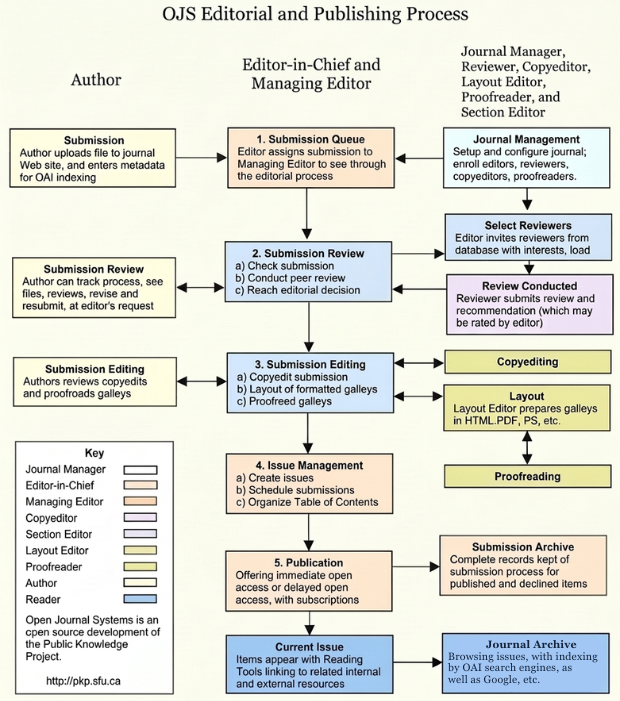
Acta Scientifica Malaysia (ASM) use OJS System for online submission and manuscript tracking. We’ve created a step-by-step guide to help you through the process of submitting your paper. Here is the link for submission
Submit your manuscript
Preparing your files
To submit your manuscript, you need the following files:
- Your manuscript (including a title page with the names of all authors and co-authors)
- Main document file including abstract, keywords, main text, and references
- Figure files
- Table files
- Any extra files such as supplemental material or biographical notes
Main document file – with all author details
A full version of your manuscript as you would like it to appear when published. Label this file as “not for review” if the journal uses double-blind peer review.
- Article title
- Journal name
- Full name and details of corresponding author
- Full names and details of all co-authors
- Acknowledgements
- Abstract
- Keywords
- Main text
- Indication of figures and tables
- References
- Appendices
Figure or table files
You can enter captions and link text before or after uploading figures, images, and tables. Organize files using thumbnails. To remove or edit a file, use the Actions drop-down menu.
If the journal uses double-blind peer review, anonymize your figures and tables before submission.
How to submit your manuscript in OJS
Follow the steps below to complete your manuscript submission. If you need additional help, you can view
OJS Learning Tutorials
- Logging into the OJS system: Use your registered account to access the submission portal.
- Starting a new submission: Click “Submit a New Manuscript.”
- Entering manuscript metadata: Add title, abstract, keywords, authors, and affiliations.
- Uploading files: Attach your main document, figures, tables, and supplementary materials.
- Providing additional information: Include conflicts of interest, funding, and other details.
- Selecting the section: Choose the journal section (e.g., Research Article, Review).
- Adding comments for editors: Optional notes for the editor.
- Reviewing submission: Double-check all information and uploaded files.
- Completing submission: Click Finish Submission.
- Continuing or revising a submission: Use your dashboard to update files or submit revisions.
More information about the publishing system, platform, and workflow by OJS/PKP: Open Journal Systems 3.2.1.4, open-source software developed by the Public Knowledge Project under GNU GPL.